
Understanding the Format of Cron Job Schedules
Introduction
Cron jobs are an essential tool for automating repetitive tasks on Unix-like operating systems. They enable users to schedule scripts or commands to run at specified times and intervals, making system maintenance, data backups, and other routine tasks more manageable. Understanding the format of a cron job schedule is crucial for effectively utilizing this powerful feature.
The Cron Job Schedule Format
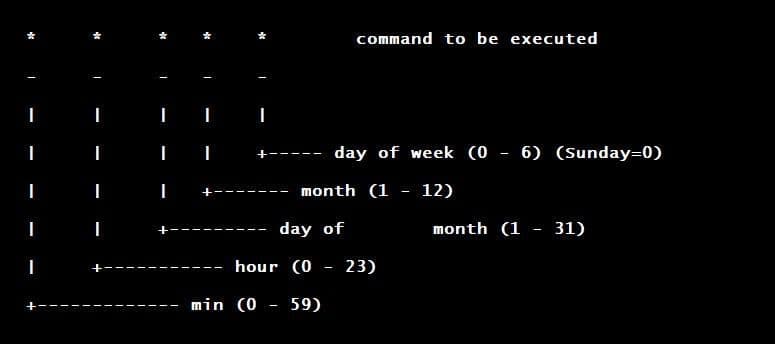
A cron job schedule is defined by a specific syntax consisting of five fields, each representing a time unit, followed by the command to be executed. The five fields are:
- Minute (0-59)
- Hour (0-23)
- Day of the month (1-31)
- Month (1-12)
- Day of the week (0-7, where both 0 and 7 represent Sunday)
Each field is separated by a space, and together they determine the precise timing for the job execution.
Field Descriptions
- Minute: This field specifies the exact minute when the job should run. Valid values range from 0 to 59. For example,
15means the job will run at the 15th minute of the specified hour. - Hour: This field defines the hour of the day (in 24-hour format) when the job should run. Valid values range from 0 (midnight) to 23. For instance,
3means the job will run at 3 AM. - Day of the Month: This field indicates the specific day of the month when the job should run. Valid values range from 1 to 31. For example,
5means the job will run on the 5th day of the month. - Month: This field specifies the month when the job should run. Valid values range from 1 (January) to 12 (December)..
- Day of the Week: This field determines the day of the week when the job should run. Valid values range from 0 to 7, where both 0 and 7 represent Sunday, and 1 through 6 represent Monday to Saturday..
Special Characters
Cron also supports special characters to provide more flexibility in scheduling:
- Asterisk (*): Represents all possible values for a field. For example, an asterisk in the hour field means every hour.
- Comma (,): Specifies a list of values. For example,
1,3,5in the hour field means the job will run at 1 AM, 3 AM, and 5 AM. - Dash (-): Specifies a range of values. For example,
1-5in the day of the week field means the job will run from Monday to Friday. - Slash (/): Specifies increments of values. For example,
*/5in the minute field means the job will run every 5 minutes.
Examples
Here are some examples to illustrate the use of the cron schedule format:
- Every minute:
* * * * * /path/to/command- Every day at 3 AM:
0 3 * * * /path/to/command- Every Monday at 5 PM:
0 17 * * 1 /path/to/command- On the 1st and 15th of every month at midnight:
0 0 1,15 * * /path/to/command- Every 10 minutes:
*/10 * * * * /path/to/commandConclusion
Understanding the format of cron job schedules is fundamental for automating tasks in a Unix-like environment. By mastering the syntax and special characters, you can create precise and flexible schedules to handle a variety of automation needs. Whether you need to run a script every minute or perform maintenance once a month, cron provides a robust framework to support your scheduling requirements.