
What is the best Laravel hosting in 2026?
Shared hosting runs Laravel, but it does not run a queue worker or a scheduler, and that is what the choice is really about. Laravel Cloud starts at $5/month plus usage from the framework's own team, with serverless Postgres and compute that scales to zero. Railway is $5/month plus usage and Render $7/month; both model long-running workers and cron as first-class processes.
Granite — our own platform — is $9/month with $15 of usage credits and runs the app, its MySQL or Postgres, its Valkey and its queue workers in a single project. Persistent volumes are available on Hobby at 350 MiB per volume, on Advanced at 1 GiB and on Professional at 30 GiB.
Last updated 5 October 2026
Laravel is the one framework in this series with a large, healthy shared-hosting tradition. A cPanel account with a `public` symlink genuinely works, costs almost nothing, and for a small brochure site there is no honest argument against it.
It stops working at a predictable point: when the application acquires a queue. Workers are long-running processes that must be restarted on every deploy, the scheduler needs a cron entry firing every minute, and configuration caches must be rebuilt as part of a build rather than by hand over FTP. That is the moment shared hosting turns from cheap into expensive, measured in your evenings.
Laravel also has a first-party platform now. Laravel Cloud is built by the framework team, knows what a queue worker and a scheduler are without being told, and starts at $5/month. On this page it gets the same treatment as everyone else — including where it costs you flexibility.
How much does Laravel hosting cost?
| Provider | From /mo | Free tier | Managed DB | Persistent disk | Deploy from |
|---|---|---|---|---|---|
| Fly.io | ~$2 | Postgres (unmanaged app) | Dockerfile, buildpack | ||
| Laravel Cloud | $5 | first month free | Serverless Postgres | no (use buckets) | Git |
| Railway | $5 | yes ($1 credits) | Git, Dockerfile, template | ||
| Render | $7 | yes (spins down) | Git, Dockerfile | ||
| Granite | $9 | yes (350 MiB on Hobby) | Git, Docker image | ||
| Koyeb | $29 | limited | Serverless Postgres | Git, Dockerfile | |
| Google Cloud Run | usage-based | yes (monthly allowance) | via Cloud SQL | no (use GCS) | Container image |
Entry prices as published by each provider on 1 September 2026, sorted cheapest first. Usage, bandwidth and databases are billed on top almost everywhere — treat this column as a starting point, not a monthly bill.
PaaS, serverless or a plain VPS?
Shared hosting earns a mention here that it does not get on the other pages in this series, because for Laravel it is a real option rather than a compromise. A brochure site or a small CMS on a cPanel account is cheap and works. The line is the queue: once you need a worker running continuously and restarting on every deploy, you are fighting the hosting model rather than using it.
A managed platform is where an application with a queue belongs. What you are buying is not the ability to run PHP — that is everywhere — but workers, cron and a build step as first-class concepts, with a managed database beside them.
Serverless fits Laravel awkwardly for one structural reason: the queue worker must run continuously by definition, so it cannot scale to zero. You end up with a request-driven web tier and an always-on worker anyway, at which point much of the appeal has gone. Laravel Cloud is the exception worth noting — its sub-500ms wake makes the scale-to-zero web tier genuinely practical.
Brochure site or small CMS, no queue, no scheduler, rare deploys
Shared hosting
Genuinely cheap and genuinely adequate — until the first background job.
Any cPanel host
There is a queue and a scheduler, and Laravel is the whole product
Laravel Cloud
First-party: workers, cron and deploys are modelled, not improvised.
Laravel Cloud
Laravel is one service among several, and you want one project and one bill
General platform
Web, worker and scheduler from one image, beside MySQL and Valkey.
Granite · Railway · Render
What does each platform actually give you?
Fly.io
- Best for
- Teams comfortable running their own database who want several regions and per-second billing.
- Pricing
- Pay as you go. The smallest shared-cpu-1x machine with 256 MB RAM works out at roughly $2.02/month, billed per second.
- Takes your Dockerfile, so the PHP version and extensions are entirely yours to pin.
- Multi-region and Anycast routing are first-class.
- Per-second billing, so stopped machines cost only storage.
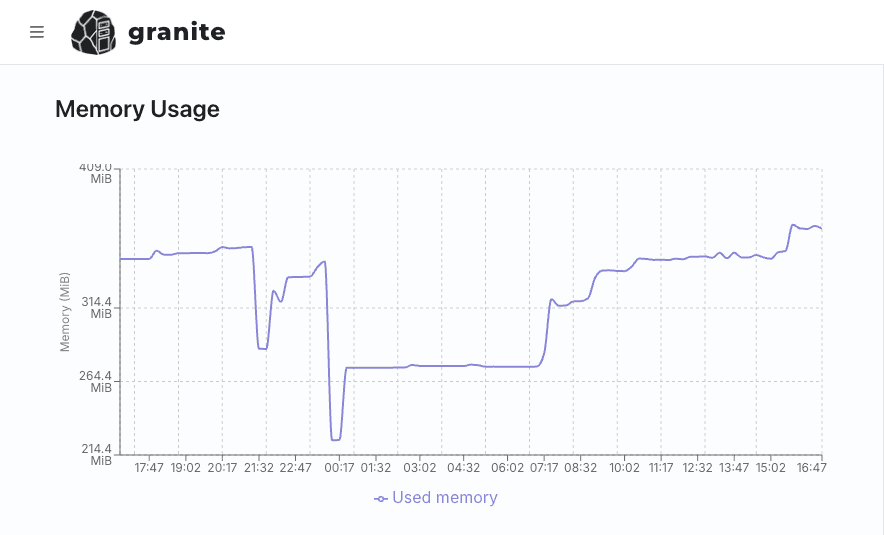
- The headline ~$2 machine has 256 MB of RAM, and the measurement below shows a modest Laravel app sitting well above that — so Fly's cheapest tier does not apply to this stack.
- MySQL or Postgres is an app you run and back up yourself.
- Queue workers and the scheduler are separate processes you define and manage rather than platform features you enable.
- No free tier for new organisations since October 2024.
Laravel Cloud
- Best for
- Laravel applications where first-party support and knowing nothing will surprise you is worth more than portability.
- Pricing
- Starter is $5/month plus usage and includes $5 of credits, with the first month free. Growth is $20/month and Business $200/month, both plus usage. Compute scales to zero and wakes in under 500ms.
- Built by the framework team: queues, scheduler, workers and the deploy pipeline are modelled directly rather than approximated.
- Serverless Postgres, Valkey and buckets are all part of the platform, so the whole stack is in one place.
- Compute scales to zero and wakes in under 500ms, which is unusually good for PHP and makes the cheap tiers genuinely usable.
- Starter is $5/month with the first month free, and spending limits are built in.
- Single-framework by design — anything else in your system needs to live somewhere else, so a mixed stack means two providers and two bills.
- Usage-based charges sit on top of the plan fee, so the $5 is a floor rather than a forecast.
- The newest platform here, with the shortest track record.
Railway
- Best for
- Getting Laravel, MySQL and Redis running together quickly.
- Pricing
- Billing is per second of actual usage against a monthly minimum: $5 on Hobby and $20 on Pro, each including that much usage credit. The free plan is a 30-day trial with $5 of credits and $1 a month afterwards, capped at 1 vCPU and 0.5 GB per service. Pro includes unlimited workspace seats.
- Templates cover the Laravel stack including the database and Redis for queues.
- Workers and cron are ordinary resource types, so the scheduler has a proper home.
- A free plan and a 30-day trial for evaluation.
- Usage-based billing on top of the base fee is hard to forecast.
- Hobby is a single-developer workspace, and sharing the project moves the minimum spend to Pro's $20 a month.
Render
- Best for
- A predictable monthly bill with managed database, workers and cron in one account.
- Pricing
- Free web services are available but spin down after 15 minutes without traffic. The cheapest paid instance, Starter, is $7/month for 0.5 vCPU and 512 MB RAM.
- Background workers and cron jobs are first-class, which covers queue:work and schedule:run cleanly.
- Managed Postgres and Redis, plus release commands for migrations.
- A real free tier for evaluating.
- Free services spin down after 15 minutes idle.
- Managed MySQL is not offered, so a Laravel app that assumes MySQL either moves to Postgres or looks elsewhere.
Granite
- Best for
- A Laravel app that is one part of a larger system, with the database, cache and uploads in the same project.
- Pricing
- Hobby is $9/month with $15 of usage credits. Advanced is $39/month with $50 of usage credits. Professional is $149/month with $200 of usage credits. Credits are shared across the project's resources; usage above the included amount requires extra credits at $1 per credit. Every plan has unlimited workspace seats.
- Managed MySQL as well as Postgres — the database most Laravel applications actually assume — plus Valkey for queues and cache, all over internal DNS with no public endpoint.
- Web app, queue worker and scheduler are three resources from one image, so the worker can never run older code than the site.
- Cron jobs are a resource type, so schedule:run is configuration rather than a hack.
- S3-compatible storage with a CDN for user uploads, billed from the project's shared usage credits.
- No free tier — the cheapest way in is $9/month, against genuinely cheap shared hosting.
- Not Laravel-specific: nothing here knows what an Artisan command is, so the deploy steps are yours to define.
- Fewer regions than the hyperscalers, and no multi-region routing yet.
Koyeb
- Best for
- Low-traffic Laravel apps where paying nothing while idle matters most.
- Pricing
- Pro is $29/month plus compute and includes $10 of it; Scale is $299/month including $100. Serverless Postgres has a free tier of 5 hours a month at 0.25 vCPU, 1 GB RAM and 1 GB of storage, after which the smallest always-on instance is $29.76/month plus $0.50 per GB stored.
- Scale-to-zero with edge locations included.
- Managed Postgres available on the platform.
- The highest entry price of the managed options.
- Scale-to-zero does not cover the queue worker, which by definition has to keep running — so the saving applies to only part of the bill.
Google Cloud Run
- Best for
- Stateless Laravel services with bursty traffic, for teams already in GCP.
- Pricing
- No monthly fee. You pay per request and per resource-second, with a monthly free allowance. Cloud SQL and networking are billed separately.
- Scales to zero and has effectively no ceiling.
- Takes any container image, so your PHP version and extensions are pinned by your Dockerfile.
- No persistent disk, so anything written to storage/app has to move to a bucket before you deploy.
- Queue workers and the scheduler do not fit the request-driven model and need separate infrastructure.
- Database, cache and secrets are separate GCP products you assemble and bill separately.
What does a Laravel app need from a host?
- Queue workers, and restarting them
- queue:work loads your application once and keeps it in memory, which means a worker started before a deploy is still running the old code afterwards. The deploy has to end with queue:restart, and the platform has to give the worker somewhere to live as a long-running process rather than a request handler.
- The scheduler is one cron entry
- Laravel expects schedule:run to fire every minute and decides internally what is due. That needs a real cron facility — a platform without one leaves you running a sleep loop in a container and pretending it is the same thing.
- Caches belong in the build
- config:cache, route:cache, view:cache and event:cache turn interpreted configuration into compiled PHP and make a measurable difference. They must run during the build or release step, because a stale cache from the previous version is worse than no cache at all.
- APP_KEY, exactly once
- The application key encrypts sessions and anything you have encrypted at rest. It must be generated once and then supplied as an environment variable; regenerating it on deploy silently invalidates every existing session and makes encrypted columns unreadable.
- Writable storage and uploads
- Laravel needs storage/ and bootstrap/cache writable, and storage:link exposes public uploads. On a container platform the local disk resets on deploy, so user uploads belong in object storage through the s3 filesystem driver rather than behind a symlink.
- Memory: workers, not requests
- PHP-FPM keeps a pool of child processes and each holds the framework in memory; the queue worker is another long-lived process doing the same. Usage therefore tracks how many processes you run rather than how many requests arrive — which is why the smallest tiers on most platforms do not fit a real Laravel app, however modest it looks.
- TrustProxies behind the load balancer
- Every platform here terminates TLS in front of your container, so Laravel sees plain HTTP and generates http:// URLs, breaking assets and redirects in ways that look like a TLS problem. Trusting the proxy headers is a two-line fix that costs an afternoon to find.
$ docker images laravel-app
REPOSITORY    TAG      SIZE
laravel-app   naive    1.01GB
laravel-app   slim     190MB
So which should you pick?
A brochure site with no queue. Shared hosting, honestly. Nothing on this page will serve you better for the money until the application grows a background job.
Laravel is the whole product and you want first-party everything. Laravel Cloud. Queues, scheduler and deploys are modelled by the people who wrote the framework, and the sub-500ms wake makes scale-to-zero practical. Start at $5/month and set a spending limit immediately, because usage sits on top.
Laravel is one service among several. This is where we would argue for Granite. Managed MySQL — the database most Laravel apps actually assume — sits beside the app with Valkey for queues and cache, all over internal DNS with no public endpoint. The web app, the queue worker and the scheduler are three resources from a single image, so the worker cannot drift onto older code, and cron is a resource type rather than a workaround. Subscriptions from $9/month with $15 of usage credits.
Multiple regions and you run your own database anyway. Fly.io.
Running other stacks beside it? The Go, Django and Rails comparisons cover the same platforms with different conclusions, and the app platform page covers workers and cron jobs in detail.
Hosting for other stacks
Six ways to run a Go binary, from a $2 machine to scale-to-zero — and why Go stays cheap longer.
Seven options weighed on the things Django actually needs: media storage, a real Postgres, Celery workers and enough memory for gunicorn.
Vercel and six alternatives, weighed on the things that actually break when you self-host: ISR across replicas, image optimization and build-time env vars.
Six ways to run an Express, NestJS or Fastify service — weighed on the event loop, the connection pool, and what a long-lived process costs while it waits.
Six platforms plus Kamal, weighed on what Rails really needs: a release phase for migrations, a job runner, Active Storage and enough memory for Puma.
Seven platforms for Django, Flask, FastAPI or a script with no HTTP port at all — and how to tell which of those you are actually deploying.
Six platforms weighed on what an ASGI service actually needs: worker processes, connections that stay open, and a database pool that does not multiply out of control.
Seven options for the framework that ships no opinions — weighed on the WSGI server you have to bring, the session key you must keep stable, and the extensions that decide the rest.
Six platforms weighed on the things Symfony assumes: a warmed cache built at build time, Messenger workers that restart on deploy, and Doctrine migrations that run exactly once.
Seven platforms for a framework that renders on every request — weighed on streaming, adapters, and how far the loaders sit from the database.
Six platforms weighed on what the JVM actually asks for: memory it is allowed to use, a container that knows its own limits, and a start-up you can afford to repeat.
Six places to run a container image, compared on what actually bites: architecture mismatches, registry access, signal handling and the volume you assumed would still be there.
Five ways to serve HTML that is already written — and an honest note about which of them we are not the right answer for.