
What is the cheapest way to host a Go app in 2026?
For a single stateless Go binary, Fly.io is the cheapest way to stay online— roughly $2/month for a 256 MB machine, which is genuinely enough for a Go service. Render's free tier is the cheapest way to park a demo, and Cloud Run bills nothing at all while an idle service waits, because Go cold-starts in milliseconds.
Granite — our own platform — is $9/month with $15 of usage credits included, and is the answer when the binary is only part of the deployment: managed Postgres, Valkey and S3-compatible storage in the same project, reachable over internal DNS with no public database endpoint.
Last updated 5 October 2026
Hosting a Go application is genuinely easier than hosting one written in Python, Ruby or Node. There is no interpreter to install, no version manager, no dependency tree to resolve at boot — the build produces one binary that runs anywhere with a compatible kernel. Every platform below can run it.
So the real question is not can a host run Go, but what you are buying on top of it: a managed database next to the service, a free tier for a side project, the ability to bring your own distroless image, or paying nothing while the thing sits idle. Those are the differences worth choosing on, and they are what this comparison is organised around.
The short version: Fly.io is the cheapest way to keep a small binary online, Render has the most usable free tier, Cloud Run wins when traffic is spiky, and Granite — our own platform — makes sense when the Go service needs a database, a queue and object storage sitting beside it. If you only need to run one stateless binary as cheaply as possible, we are not the right answer, and the table says so.
How much does Go hosting cost?
| Provider | From /mo | Free tier | Managed DB | Persistent disk | Deploy from |
|---|---|---|---|---|---|
| Fly.io | ~$2 | Postgres (unmanaged app) | Dockerfile, buildpack | ||
| Railway | $5 | yes ($1 credits) | Git, Dockerfile, template | ||
| Render | $7 | yes (spins down) | Git, Dockerfile | ||
| Granite | $9 | yes (350 MiB on Hobby) | Git, Docker image | ||
| Koyeb | $29 | limited | Serverless Postgres | Git, Dockerfile | |
| Google Cloud Run | usage-based | yes (monthly allowance) | via Cloud SQL | no (use GCS) | Container image |
Entry prices as published by each provider on 1 September 2026, sorted cheapest first. Usage, bandwidth and databases are billed on top almost everywhere — treat this column as a starting point, not a monthly bill.
PaaS, serverless or a plain VPS?
A VPS is always cheaper per gigabyte, and it always will be. What a platform sells you is everything around the binary: TLS certificates and their renewal, zero-downtime rollouts, log collection, database backups, and someone else being responsible when the host reboots at 3am. If you would otherwise spend an evening a month on that, the difference between a $5 VPS and a $9 platform is not what decides your project.
Serverless — Cloud Run and Koyeb's scale-to-zero — fits Go better than it fits most languages. A compiled binary with no runtime to boot starts in milliseconds, so the cold-start penalty that makes this painful for the JVM or Rails is barely there. The catch is what surrounds the process: if your service opens a database connection pool on every cold start, you will pay for that far more than for the binary. Chatty-with-a-database services are usually both faster and cheaper on a small always-on instance.
A managed platform is the middle ground, and it is where most production Go services end up: a predictable monthly floor, a database you are not operating yourself, and no Kubernetes to learn.
Steady traffic, and the service needs a database, storage or a queue beside it
Managed platform
A predictable monthly floor and nothing to operate yourself.
Granite · Railway · Render
Spiky or mostly absent traffic, and paying nothing while idle matters most
Serverless
Scales to zero, and Go's millisecond start makes the cold start cheap.
Cloud Run · Koyeb
You would rather administer it yourself and price per gigabyte decides
Plain VPS
Cheapest per resource — you own TLS, rollouts, backups and uptime.
Hetzner · DigitalOcean · anyone
What does each platform actually give you?
Fly.io
- Best for
- The cheapest way to keep a small Go binary running, and the best option if you need several regions.
- Pricing
- Pay as you go. The smallest shared-cpu-1x machine with 256 MB RAM works out at roughly $2.02/month, billed per second.
- Cheapest entry point in this table, and a 256 MB machine is genuinely enough for most Go services.
- Multi-region deployment and Anycast routing are first-class, not add-ons.
- Per-second billing, so stopped machines cost only storage.
- No free tier for new organisations since October 2024.
- You manage more infrastructure yourself — Machines, volumes and networking are exposed concepts.
- Postgres is a Fly app you operate, not a managed service with someone else on call.
Railway
- Best for
- Trying an idea quickly, and for teams that want a large template library to start from.
- Pricing
- Billing is per second of actual usage against a monthly minimum: $5 on Hobby and $20 on Pro, each including that much usage credit. The free plan is a 30-day trial with $5 of credits and $1 a month afterwards, capped at 1 vCPU and 0.5 GB per service. Pro includes unlimited workspace seats.
- Excellent first-run experience; the template catalogue covers most common stacks.
- A free plan and a trial, so you can evaluate without a card.
- Databases sit alongside services in the same project.
- Usage-based billing on top of the base fee makes the monthly cost hard to predict.
- Hobby is single-developer only; inviting anyone else puts the workspace on Pro at a $20 monthly minimum.
Render
- Best for
- A free place to park a demo, and a simple paid tier once it matters.
- Pricing
- Free web services are available but spin down after 15 minutes without traffic. The cheapest paid instance, Starter, is $7/month for 0.5 vCPU and 512 MB RAM.
- A real free tier for web services, which is rare now.
- Straightforward model: pick an instance size, push to Git.
- 512 MB on the Starter tier is comfortable for a Go service, even though it is tight for Rails or Django.
- Free services cold-start after idling, so the first request is slow.
- Costs climb quickly once you need more than one small instance.
Granite
- Best for
- Running a Go service together with the Postgres, Valkey and object storage it depends on, without wiring any networking.
- Pricing
- Hobby is $9/month with $15 of usage credits. Advanced is $39/month with $50 of usage credits. Professional is $149/month with $200 of usage credits. Credits are shared across the project's resources; usage above the included amount requires extra credits at $1 per credit. Every plan has unlimited workspace seats.
- Managed Postgres, MySQL, Valkey, S3-compatible storage and a private Docker registry live in the same project and reach each other over internal DNS.
- Databases have no public endpoint — they stay inside the cluster.
- Unlimited workspace seats on every plan, so team size never changes the bill.
- Deploy a prebuilt image or let Granite build from GitHub, GitLab or Bitbucket.
- No free tier — the cheapest way in is $9/month.
- Persistent volumes are limited to 350 MiB on Hobby; Advanced supports 1 GiB and Professional 30 GiB per volume.
- Fewer regions than the hyperscalers, and no multi-region routing yet.
Koyeb
- Best for
- Global edge deployment with scale-to-zero, if the entry price is acceptable.
- Pricing
- Pro is $29/month plus compute and includes $10 of it; Scale is $299/month including $100. Serverless Postgres has a free tier of 5 hours a month at 0.25 vCPU, 1 GB RAM and 1 GB of storage, after which the smallest always-on instance is $29.76/month plus $0.50 per GB stored.
- Scale-to-zero pairs well with Go, which cold-starts in milliseconds.
- Edge locations included rather than sold separately.
- The highest entry price of any managed option here.
- Smaller ecosystem and community than Railway or Render.
Google Cloud Run
- Best for
- Spiky or low-traffic workloads where paying nothing while idle matters more than simplicity.
- Pricing
- No monthly fee. You pay per request and per resource-second, with a monthly free allowance. Cloud SQL and networking are billed separately.
- Scales to zero, so an idle service is genuinely free.
- Effectively unlimited scale ceiling if something takes off.
- Takes any container image, which suits a distroless Go build perfectly.
- You assemble the rest yourself — database, secrets, networking are separate GCP products.
- Billing is hard to predict and hard to explain to a finance team.
- No persistent disk; state has to live in Cloud Storage or a database.
What does a Go app need from a host?
- Bring your own image
- A Go binary needs no runtime, so the ideal image is distroless or scratch — around ten megabytes instead of well over a gigabyte. That only helps if the platform accepts your Dockerfile rather than forcing a buildpack that ships a full toolchain into the final layer.
- Small instance tiers
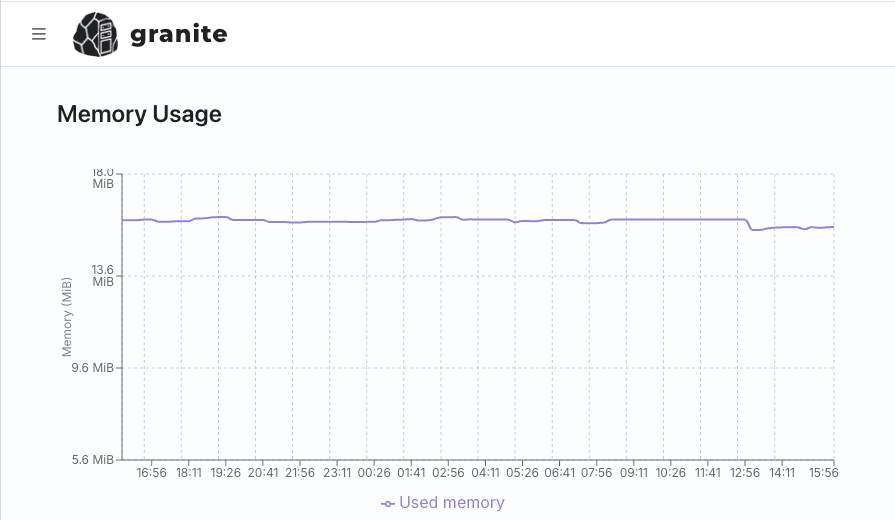
- A typical Go HTTP service with a connection pool idles in the tens of megabytes of RAM. The 256 MB and 512 MB tiers that are uncomfortably tight for Django or Rails are genuinely enough here, which is why Go hosting stays cheap far longer.
- Build caching
- Go builds are fast but not free, and a cold module download on every deploy is a minute you pay for on every push. Check whether the platform caches the module and build cache between builds.
- SIGTERM handling
- Rolling deploys send SIGTERM and then wait. If your server does not call Shutdown on that signal, in-flight requests are killed on every release. Confirm the grace period the platform gives you and match it to your shutdown timeout.
- Health checks
- Almost every platform routes traffic based on a readiness endpoint. A Go service that opens a database pool at startup should not report ready until that pool actually connects, or the first requests after a deploy will fail.
- No version treadmill
- Unlike Python or Node, the Go toolchain lives in your build, not on the platform. You are never waiting for a host to support a new language version — a small but real operational advantage that rarely gets mentioned.
$ docker images go-app
REPOSITORY   TAG          SIZE
go-app       naive        1.44GB
go-app       distroless   13.5MB
Where do background jobs and queue workers run?
A goroutine is not a queue. go doWork() is free and immediate, and it is also gone the moment the container is replaced — which on a platform that redeploys on every push is often. For work that must survive a restart you want a real queue: asynq against Redis or Valkey, or River against the Postgres you already run, both with an explicit consumer binary. Because a Go image already contains a static binary, that consumer costs almost nothing to add — the same build, a second entry point, a second small instance. On Granite it is a worker resource from the same image with a different command, sharing the application's environment variables, and a job whose lease expires while the container is being replaced simply runs again.
How do scheduled tasks and cron work?
robfig/cron inside the service is the idiomatic-looking option and the one that quietly doubles your work: the ticker exists in every replica, so two containers means two runs of the nightly reconciliation. Either move the schedule behind a lock the replicas share, or take it out of the binary. asynq has periodic tasks enqueued through Redis, claimed once. A platform cron is the plainest answer — on Granite a cron-job resource runs /app/bin/reconcile on a cron expression as one container, with Forbid or Allow deciding what an overrun does, and its output stays in that resource's log rather than mixed into the API stream.
Is Postgres managed, and what about backups?
Managed on Render, Railway, Koyeb and Granite; on Fly the Postgres is an app you deploy and are responsible for, which for a stateless Go service is a bigger commitment than the service itself. Granite runs scheduled backups into external storage and support can perform point-in-time recovery for Postgres on request, with no published interval — ask if you need a number. Databases have no public endpoint: the binary connects over internal DNS, you connect with novps port-forward database <id> -l 5432. Set MaxConns on your pgxpool deliberately rather than leaving the default, because Go will happily open more sockets than a 256 MB managed instance is willing to accept.
How do deploys and migrations work?
Push to the tracked branch and the platform runs your multi-stage build, or push the image yourself and let it watch the tag. Schema migrations — goose up, migrate up — belong in a step that runs once, not in main() where every replica applies them simultaneously. Render and Railway have a release command; on Granite you run the migration from the resource's Console tab or over a forwarded database port, before the new image is rolled out. Handle SIGTERM while you are here: the platform sends it, waits, then kills, and a server that ignores it drops the requests it was already serving on every deploy.
What does it actually cost per month?
An HTTP service, a queue consumer and a small Postgres, as of 1 September 2026. This is where a compiled binary pays off: Fly.io runs both processes on shared-cpu-1x machines with 256 MB for $2.02 each — genuinely enough for Go — leaving only the database to arrange. Render is $7 for the web service, $7 for the worker and $6 for a 256 MB Postgres, so $20. Cloud Run bills $0.000018 per vCPU-second with 180,000 free a month, and Go's sub-second cold start is what makes scale-to-zero honest here. Granite starts at $9/month with $15 of credits across all three, and an Extra Small replica's 1 GiB is generous for a binary that idles in tens of megabytes. Usage beyond the included credits requires extra credits at $1 per credit; the subscription price is not a quote for the complete stack.
So which should you pick?
A side project you want online for as little as possible. Fly.io, at roughly $2/month for a 256 MB machine. If you would rather pay nothing at all and can live with a cold start after idle, Render's free tier.
Traffic that is spiky or mostly absent. Cloud Run. Scaling to zero means an idle service is genuinely free, and Go's millisecond start makes the trade-off cheap.
Users in several regions. Fly.io. Multi-region and Anycast routing are built in rather than assembled.
A real application, not just a binary. This is where we would argue for Granite: when the Go service needs Postgres or Valkey, somewhere to put uploads, and a private registry, having them in one project with internal DNS and no public database endpoint removes an entire category of configuration — and of mistakes. From $9/month with $15 of usage credits included.
Already know how you want to deploy? The app platform page covers building from Git, running prebuilt images, workers and cron jobs.
Hosting for other stacks
Seven options weighed on the things Django actually needs: media storage, a real Postgres, Celery workers and enough memory for gunicorn.
Vercel and six alternatives, weighed on the things that actually break when you self-host: ISR across replicas, image optimization and build-time env vars.
Six ways to run an Express, NestJS or Fastify service — weighed on the event loop, the connection pool, and what a long-lived process costs while it waits.
Six platforms plus Kamal, weighed on what Rails really needs: a release phase for migrations, a job runner, Active Storage and enough memory for Puma.
Laravel Cloud and six alternatives, weighed on queue workers, the scheduler, writable storage and the caches you must rebuild on every deploy.
Seven platforms for Django, Flask, FastAPI or a script with no HTTP port at all — and how to tell which of those you are actually deploying.
Six platforms weighed on what an ASGI service actually needs: worker processes, connections that stay open, and a database pool that does not multiply out of control.
Seven options for the framework that ships no opinions — weighed on the WSGI server you have to bring, the session key you must keep stable, and the extensions that decide the rest.
Six platforms weighed on the things Symfony assumes: a warmed cache built at build time, Messenger workers that restart on deploy, and Doctrine migrations that run exactly once.
Seven platforms for a framework that renders on every request — weighed on streaming, adapters, and how far the loaders sit from the database.
Six platforms weighed on what the JVM actually asks for: memory it is allowed to use, a container that knows its own limits, and a start-up you can afford to repeat.
Six places to run a container image, compared on what actually bites: architecture mismatches, registry access, signal handling and the volume you assumed would still be there.
Five ways to serve HTML that is already written — and an honest note about which of them we are not the right answer for.