
Where should you host a Next.js app if not on Vercel?
Vercel is free for personal projects and $20 per member per month for a team, and it is the only place where every Next.js feature works without configuration. Self-hosting is entirely reasonable once you know which three parts change: incremental regeneration across replicas, image optimization, and env vars that are baked in at build time rather than read at boot.
Of the alternatives, Fly.io from about $2/month is the cheapest way to keep one online and Render at $7/month the simplest. Granite — our own platform — is $9/month with $15 of usage credits, and fits when the app should sit next to a managed Postgres rather than call one across the internet.
Last updated 5 October 2026
Let us start with the obvious: Vercel builds Next.js, and on Vercel everything in the docs works exactly as written. If your project is a marketing site or an app with light traffic and you value never thinking about infrastructure, that is a good answer and this page is not trying to talk you out of it.
People move anyway, usually for one of three reasons: the bill became unpredictable as traffic grew, the app needs to sit next to a database and a worker rather than call them over the internet, or data has to stay somewhere specific. All three are real, and all three are solvable — but self-hosting Next.js means taking responsibility for a handful of features that Vercel was quietly providing.
This page is organised around those features, because they matter far more than the price per gigabyte. Get the standalone build, the ISR cache and the image optimizer right and Next.js is an ordinary Node service that any platform below will run happily.
How much does Next.js hosting cost?
| Provider | From /mo | Free tier | Managed DB | Persistent disk | Deploy from |
|---|---|---|---|---|---|
| Vercel | $0 / $20 | yes (non-commercial) | via marketplace | Git | |
| Fly.io | ~$2 | Postgres (unmanaged app) | Dockerfile, buildpack | ||
| Railway | $5 | yes ($1 credits) | Git, Dockerfile, template | ||
| Render | $7 | yes (spins down) | Git, Dockerfile | ||
| Granite | $9 | yes (350 MiB on Hobby) | Git, Docker image | ||
| Koyeb | $29 | limited | Serverless Postgres | Git, Dockerfile | |
| Google Cloud Run | usage-based | yes (monthly allowance) | via Cloud SQL | no (use GCS) | Container image |
Entry prices as published by each provider on 1 September 2026, sorted cheapest first. Usage, bandwidth and databases are billed on top almost everywhere — treat this column as a starting point, not a monthly bill.
PaaS, serverless or a plain VPS?
Vercel is a category of its own here, and pretending otherwise would be dishonest. It is the reference implementation: every feature works, and the trade is price predictability and the distance between your app and your data. Most teams that leave do so when one of those two starts to hurt, not because they found something cheaper.
A managed platform is where self-hosted Next.js normally lands. You run a plain Node server from a standalone build, and in exchange you get the database, the cache and the storage in the same project — which is what makes the ISR and uploads problems tractable rather than painful.
Serverless looks attractive because Node starts quickly, and it is the trickiest of the three for this framework. Scale-to-zero and incremental regeneration pull in opposite directions: the whole point of ISR is a warm cache, and the whole point of scaling to zero is not keeping one. It works, but only with a shared cache handler and eyes open.
Next.js is the whole product, traffic is moderate, infrastructure is not your problem
Vercel
Everything works as documented, at $20 per seat once it stops being personal.
Vercel
The app lives next to a database, a cache and uploads, and the bill should be predictable
Managed platform
A standalone build as an ordinary Node service, with its data in the same project.
Granite · Railway · Render
Mostly idle, or traffic arrives in unpredictable bursts
Serverless
Free while asleep — but the ISR cache needs a shared backend to survive.
Cloud Run · Koyeb
What does each platform actually give you?
Vercel
- Best for
- Anything where Next.js is the whole product and you would rather not think about infrastructure.
- Pricing
- Hobby is free forever but intended for personal, non-commercial projects. Pro is $20 per team member per month, including $20 of usage credit, with pay-as-you-go beyond it.
- First-party: ISR, on-demand revalidation, image optimization and middleware work exactly as documented, with no configuration at all.
- Preview deployments per pull request are excellent and genuinely hard to replicate.
- The edge network and CDN are included rather than assembled.
- Hobby is for personal, non-commercial projects, so anything real starts at $20 per team member per month.
- Usage-based bandwidth and function pricing is the source of the surprise-bill stories; it is manageable with spend limits, but you have to set them.
- Databases and workers live somewhere else, so a data-heavy app pays for every round trip across the public internet.
Fly.io
- Best for
- Running the Node server close to users in several regions on a small budget.
- Pricing
- Pay as you go. The smallest shared-cpu-1x machine with 256 MB RAM works out at roughly $2.02/month, billed per second.
- Multi-region and Anycast routing are first-class, which recovers some of the edge behaviour you lose leaving Vercel.
- Takes your Dockerfile, so a standalone build ships exactly as you built it.
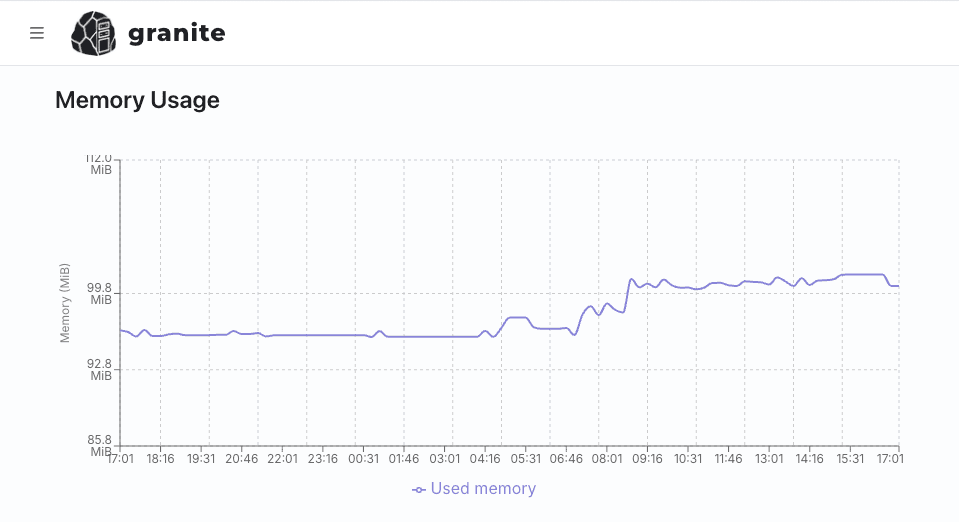
- Per-second billing, and the cheapest machines are genuinely usable here — a standalone Next.js server's baseline is around a hundred megabytes, as the measurement below shows, so unlike heavier stacks the headline price actually applies.
- No free tier for new organisations since October 2024.
- Multi-region makes the ISR cache problem worse, not better — each region needs to agree on what is current, which means a shared cache handler.
- Postgres is a Fly app you run yourself.
Railway
- Best for
- Getting the app, a database and a cache running together quickly.
- Pricing
- Billing is per second of actual usage against a monthly minimum: $5 on Hobby and $20 on Pro, each including that much usage credit. The free plan is a 30-day trial with $5 of credits and $1 a month afterwards, capped at 1 vCPU and 0.5 GB per service. Pro includes unlimited workspace seats.
- Detects Next.js and builds it without configuration.
- Postgres and Redis sit in the same project, which is what an ISR cache handler needs.
- A free plan and a trial to evaluate on.
- Usage-based billing on top of the base fee is hard to forecast.
- No CDN of its own, so static assets want a CDN in front for anything traffic-heavy.
Render
- Best for
- A predictable monthly bill for a straightforward Next.js app.
- Pricing
- Free web services are available but spin down after 15 minutes without traffic. The cheapest paid instance, Starter, is $7/month for 0.5 vCPU and 512 MB RAM.
- A real free tier for evaluating, and simple fixed instance pricing after that.
- Managed Postgres, Redis, cron jobs and workers all in one place.
- Static assets are served through a CDN without extra setup.
- Free services spin down after 15 minutes idle.
- Fixed instance sizes mean you provision for the image optimizer's peaks rather than the app's small steady state, so the 512 MB Starter tier has less spare room than the baseline numbers suggest.
Granite
- Best for
- A Next.js front end that belongs next to its database, its cache and its uploads rather than calling them across the internet.
- Pricing
- Hobby is $9/month with $15 of usage credits. Advanced is $39/month with $50 of usage credits. Professional is $149/month with $200 of usage credits. Credits are shared across the project's resources; usage above the included amount requires extra credits at $1 per credit. Every plan has unlimited workspace seats.
- Postgres or MySQL, Valkey and S3-compatible storage run in the same project over internal DNS — Valkey is exactly what a shared ISR cache handler needs, and the bucket is where uploads belong.
- Monthly usage credits shared across the project, with extra credits available at $1 per credit.
- Runs your own image, so the standalone build and its Node version are yours to pin.
- Background workers and cron jobs are first-class, which covers revalidation jobs and scheduled work.
- No free tier — the cheapest way in is $9/month.
- No global edge network: you pick a region, and visitors far from it pay the latency.
- Preview environments per pull request are not part of the workflow the way they are on Vercel.
Koyeb
- Best for
- Edge presence with scale-to-zero for a mostly-idle app.
- Pricing
- Pro is $29/month plus compute and includes $10 of it; Scale is $299/month including $100. Serverless Postgres has a free tier of 5 hours a month at 0.25 vCPU, 1 GB RAM and 1 GB of storage, after which the smallest always-on instance is $29.76/month plus $0.50 per GB stored.
- Edge locations included, which helps recover global latency.
- Node cold starts are quick enough that scale-to-zero is tolerable here, unlike heavier runtimes.
- The highest entry price of the managed options.
- Scale-to-zero and ISR interact badly: a cold instance has an empty cache and regenerates pages a warm one would have served instantly.
Google Cloud Run
- Best for
- Bursty traffic where an idle app should cost nothing and you are comfortable in GCP.
- Pricing
- No monthly fee. You pay per request and per resource-second, with a monthly free allowance. Cloud SQL and networking are billed separately.
- Scales to zero and has effectively no ceiling.
- Takes any container, so a standalone build deploys unchanged.
- Per-request billing suits spiky marketing traffic.
- No persistent disk, so the default filesystem ISR cache is useless — a shared cache handler is mandatory, not optional.
- Every instance keeps its own in-memory state, so revalidation across instances needs deliberate design.
- Database, CDN and secrets are separate products you assemble and bill separately.
What does a Next.js app need from a host?
- output: 'standalone'
- The single most important line in next.config when self-hosting. It produces a server bundle with only the dependencies actually used, so you ship that instead of the whole node_modules tree. It is the difference between an image measured in gigabytes and one measured in hundreds of megabytes.
- A shared ISR cache
- By default the incremental cache is written to the local filesystem. With one instance that is fine. With two, they disagree about what is current, revalidation happens twice, and users see pages flip between versions. Point a custom cache handler at Redis or Valkey before you scale past a single replica — or on any platform without a persistent disk, before you deploy at all.
- Image optimization
- next/image optimises on the server, and it is the most resource-hungry thing in a typical Next.js app. Self-hosted, that cost lands on your instance: an uncached burst of large images is the classic way to exhaust a small container. Give it headroom, put a CDN in front of it, or hand the work to an external loader.
- Build-time versus runtime env
- Anything prefixed NEXT_PUBLIC_ is baked into the bundle at build time. That means one image cannot serve staging and production with different public values — you either rebuild per environment or keep those values out of the client. This surprises almost everyone once.
- Middleware on every request
- On Vercel middleware runs at the edge before your app. Self-hosted it runs inside the Node server on every matched request, so its cost is now your cost. Narrow the matcher, and do not put anything expensive there.
- Small baseline, spiky peaks
- A standalone Next.js server idles in roughly a hundred megabytes — light next to an interpreted stack running several worker processes, and the reason the cheapest tiers stay viable longer here. What you actually size for is the image optimizer, which allocates per image while generating variants. Provision for the peak rather than the average, and keep a CDN in front so the peak is rare.
- Uploads and the filesystem
- The container filesystem is discarded on deploy and not shared between replicas, so anything a user uploads belongs in object storage from the first commit, not after the first data loss.
$ docker images next-app
REPOSITORY   TAG           SIZE
next-app     naive         2.5GB
next-app     standalone    416MB
Where do background jobs and queue workers run?
Nowhere inside Next.js, and that is the whole difficulty. A serverless function ends when it returns a response, so work started in a Route Handler and left to finish afterwards is killed halfway through — there is no long-lived process for it to belong to. The fix is a second deployable: a plain Node entry point running BullMQ against Valkey, or pg-boss against the Postgres you already have, started with node worker.js. On a container platform that is an ordinary process — on Granite a worker resource built from the same image as the site, with a different command and the same environment variables. On Vercel it is a service you rent elsewhere and call over the network, which is the real cost of staying serverless with a queue.
How do scheduled tasks and cron work?
Two shapes. The serverless one is a Route Handler at /api/cron/digest that something external calls on a schedule, guarded by a shared secret so the internet cannot trigger it; it inherits the function timeout, so it dispatches work rather than doing it. The container one is a scheduled command: on Granite a cron-job resource runs node scripts/digest.js as a single container on a cron expression, with Forbid or Allow for an overrunning job. On-demand ISR is the third thing people mean by this — revalidateTag fired from a webhook is a rebuild trigger, not a scheduler, and it needs a cache every replica shares.
Is Postgres managed, and what about backups?
Vercel sells the database through its marketplace; Render, Railway, Koyeb and Granite run one themselves. Granite's backups go on a schedule to external storage, with point-in-time recovery for Postgres available through support on request, and the interval is not published — worth confirming before you write it into a runbook. There is no public endpoint: Next.js reaches the database over internal DNS, and you reach it with novps port-forward database <id> -l 5432. Connection count is the trap on the serverless side, where every warm function instance holds its own pool and a traffic spike opens hundreds of sockets; a pooler in front of the database is what keeps that survivable.
How do deploys and migrations work?
Outside Vercel the unit is a container, which means output: 'standalone' in next.config.js and a build that produces an image — either from a push to the tracked branch or from a Docker tag the platform watches. Migrations run once, in a release step, not on container start where three replicas would race. Render and Railway provide the hook; Granite does not, so run prisma migrate deploy from the resource's Console tab or over a forwarded port before the new image rolls out. Keep build-time and runtime environment variables straight while you are there: anything inlined at build is baked into the image and does not change when you edit it later.
What does it actually cost per month?
A rendered site, a queue consumer and a small Postgres, priced as of 1 September 2026. Vercel is $0 on Hobby for a non-commercial project and $20 on Pro with $20 of usage credit, but there is no worker here — the consumer and its broker are bought elsewhere. Render is $7 for the web service, $7 for the worker and $6 for a 256 MB Postgres, so $20. Fly.io is $3.32 per 512 MB machine, twice, plus a Postgres you run. Granite starts at $9/month with $15 of credits across all three, and an Extra Small replica at $5 is comfortable for a standalone Next.js server that is mostly waiting on the database. Usage beyond the included credits requires extra credits at $1 per credit; the subscription price is not a quote for the complete stack.
So which should you pick?
Next.js is the product and you want zero infrastructure work. Vercel. Budget $20 per seat per month and set a spend limit on day one.
The app needs to sit next to its database, cache and uploads. This is where we would argue for Granite: a standalone build runs as a normal service, and Postgres, Valkey and S3-compatible storage are in the same project over internal DNS. Valkey doubles as the shared ISR cache, which is the one piece of self-hosting people usually get wrong. Hobby starts at $9/month with $15 of shared usage credits. Usage beyond that allowance requires extra credits at $1 per credit.
Global audience on a small budget. Fly.io, accepting that multi-region makes the shared cache mandatory rather than optional.
Mostly idle, bursty, and already in GCP. Cloud Run — with a cache handler configured before the first deploy, because there is no disk to fall back on.
Running an API behind the front end? The Go and Django comparisons cover the same platforms from the back-end side, and the app platform page covers workers and cron jobs.
Hosting for other stacks
Six ways to run a Go binary, from a $2 machine to scale-to-zero — and why Go stays cheap longer.
Seven options weighed on the things Django actually needs: media storage, a real Postgres, Celery workers and enough memory for gunicorn.
Six ways to run an Express, NestJS or Fastify service — weighed on the event loop, the connection pool, and what a long-lived process costs while it waits.
Six platforms plus Kamal, weighed on what Rails really needs: a release phase for migrations, a job runner, Active Storage and enough memory for Puma.
Laravel Cloud and six alternatives, weighed on queue workers, the scheduler, writable storage and the caches you must rebuild on every deploy.
Seven platforms for Django, Flask, FastAPI or a script with no HTTP port at all — and how to tell which of those you are actually deploying.
Six platforms weighed on what an ASGI service actually needs: worker processes, connections that stay open, and a database pool that does not multiply out of control.
Seven options for the framework that ships no opinions — weighed on the WSGI server you have to bring, the session key you must keep stable, and the extensions that decide the rest.
Six platforms weighed on the things Symfony assumes: a warmed cache built at build time, Messenger workers that restart on deploy, and Doctrine migrations that run exactly once.
Seven platforms for a framework that renders on every request — weighed on streaming, adapters, and how far the loaders sit from the database.
Six platforms weighed on what the JVM actually asks for: memory it is allowed to use, a container that knows its own limits, and a start-up you can afford to repeat.
Six places to run a container image, compared on what actually bites: architecture mismatches, registry access, signal handling and the volume you assumed would still be there.
Five ways to serve HTML that is already written — and an honest note about which of them we are not the right answer for.